
Premium Club
Premium Club TV
Apollo is undergoing a server balancing migration, the underlying service is exactly the same. You will have this popup on your TV, that will have you confirm your account is being ‘migrated’. The only difference really is, you will have a revised M3U link, as well, can only use Startup Show (257276). Not the Apollo App (299336).
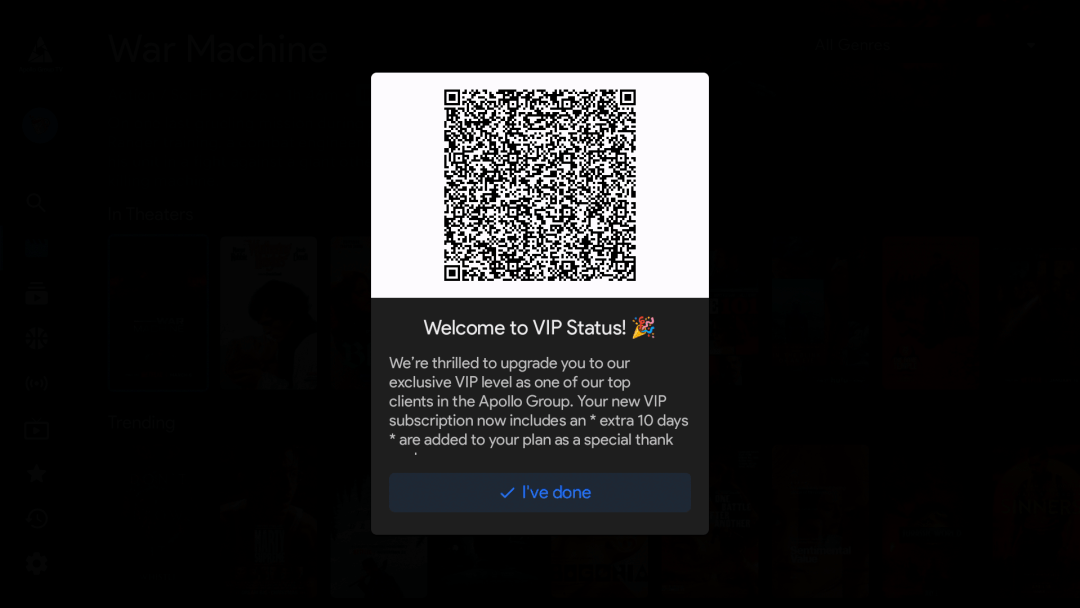
VIP Status Popup
1. Scan the QR Code on your screen (if you cannot scan, login to the ‘portal’)
2. You will be prompted on the site as well, then just hit confirm
3. Will be provided a revised M3U link (to log in, note the apollo app (299336) will not work anymore. Hence the installation guide on our site, for Startup Show (257276)
QR Code Still remaining on your Device ?
Minimum Recommendation: Chromecast with Google TV (4K)
Simply clear the cache…
Firestick: Home –> Settings –> Applications –> Manage Installed Applications –> Clear Cache; Clear Data; Force Stop; Launch Application.
Then Enter your revised M3U link to sign in:
Example Below:
https://laon.live/api/list/USERNAME/PASSWORD
Few Notable Changes:
- Service is the same
- Startup Show is the app of choice
- Web player will not work
- Will have an extra 10 days added to your subsciption
Rule of Thumb:
1. Recommended Device
2. Properly Configured VPN (follow the two steps, and stick to canadian or US city)
No Issues from that point. Reach out for further support. And be careful of the many scam sites out there.
Email:
info@apollotvcanada.com
Location:
Canada